From 1 September 2026, all French businesses subject to VAT must be able to receive electronic invoices. From the same date, large companies and mid-sized companies (ETIs) must also issue invoices electronically. For SMEs and micro-enterprises, the obligation to issue electronic invoices applies from 1 September 2027.
With Equicty, you can activate French e-invoicing directly from your account. Equicty works with B2Brouter, a Plateforme Agréée (PA) approved by the French tax authorities.
This article explains how to activate e-invoicing, monitor your registration status, and what to do if your company is already registered with another provider.
Important: Activation is performed separately for each legal entity and SIREN number. If you have several French companies configured in your Equicty account, e-invoicing must be activated for each company individually.
- 1. Check your company information
- 2. Start the e-invoicing activation
- 3. Check the activation information
- 4. Check your invoicing terms
- 5. Designate B2Brouter as your Plateforme Agréée
- 6. What happens after activation?
- 7. Publication in the Annuaire may take some time
- 8. Check your registration in the official Annuaire
- 9. What if activation fails because your company is already registered?
- 10. How do I switch from another provider to Equicty?
- 11. When is activation complete?
1. Check your company information
In Equicty, go to:
My stable → Stable details
Select the French company for which you want to activate e-invoicing.
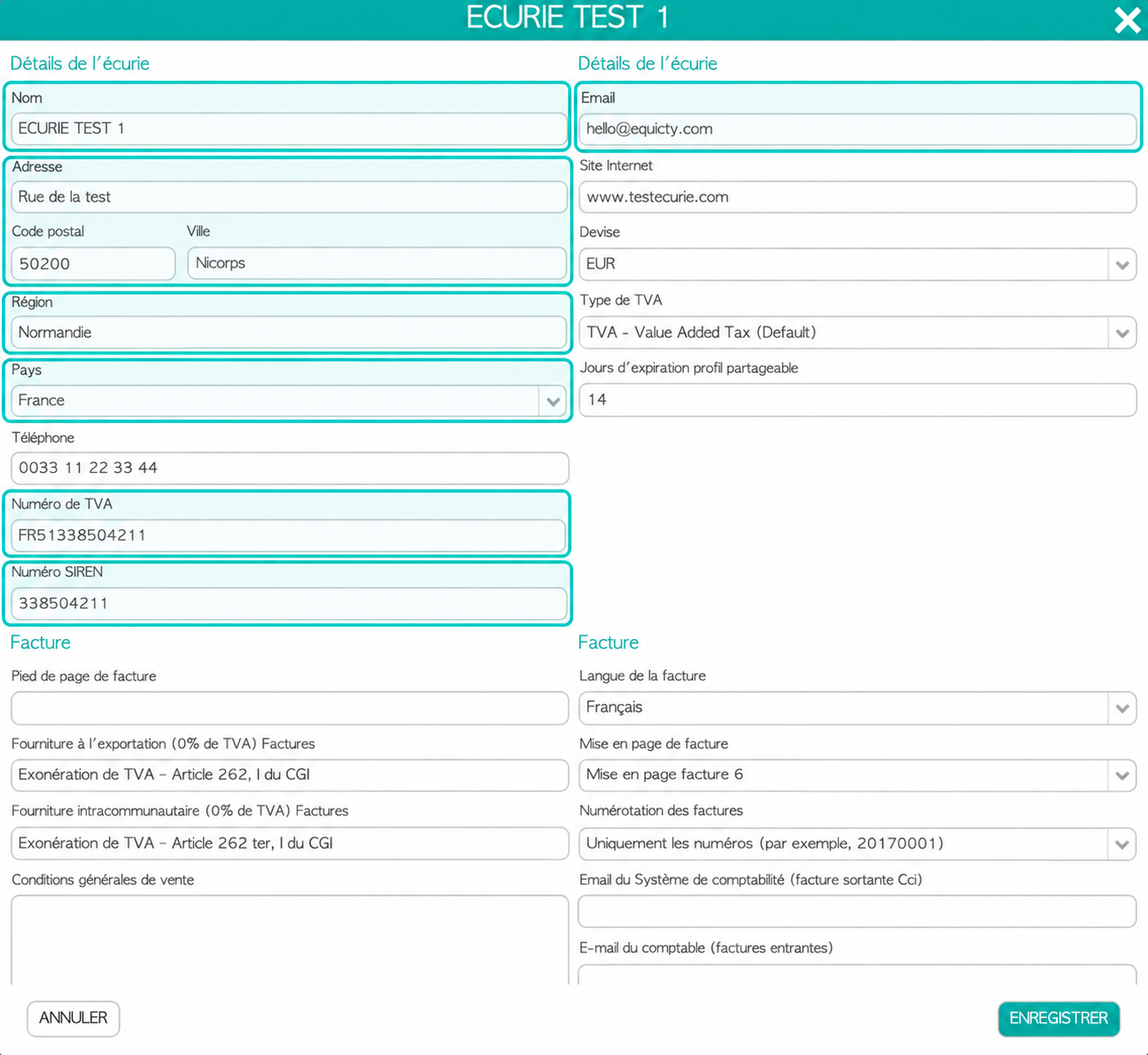
Before starting the activation, make sure all required company information has been entered correctly.
Check in particular:
- Company name
- Official address
- Country: France
- French VAT number
- SIREN number
- Email address
- Region
Check your French invoicing information
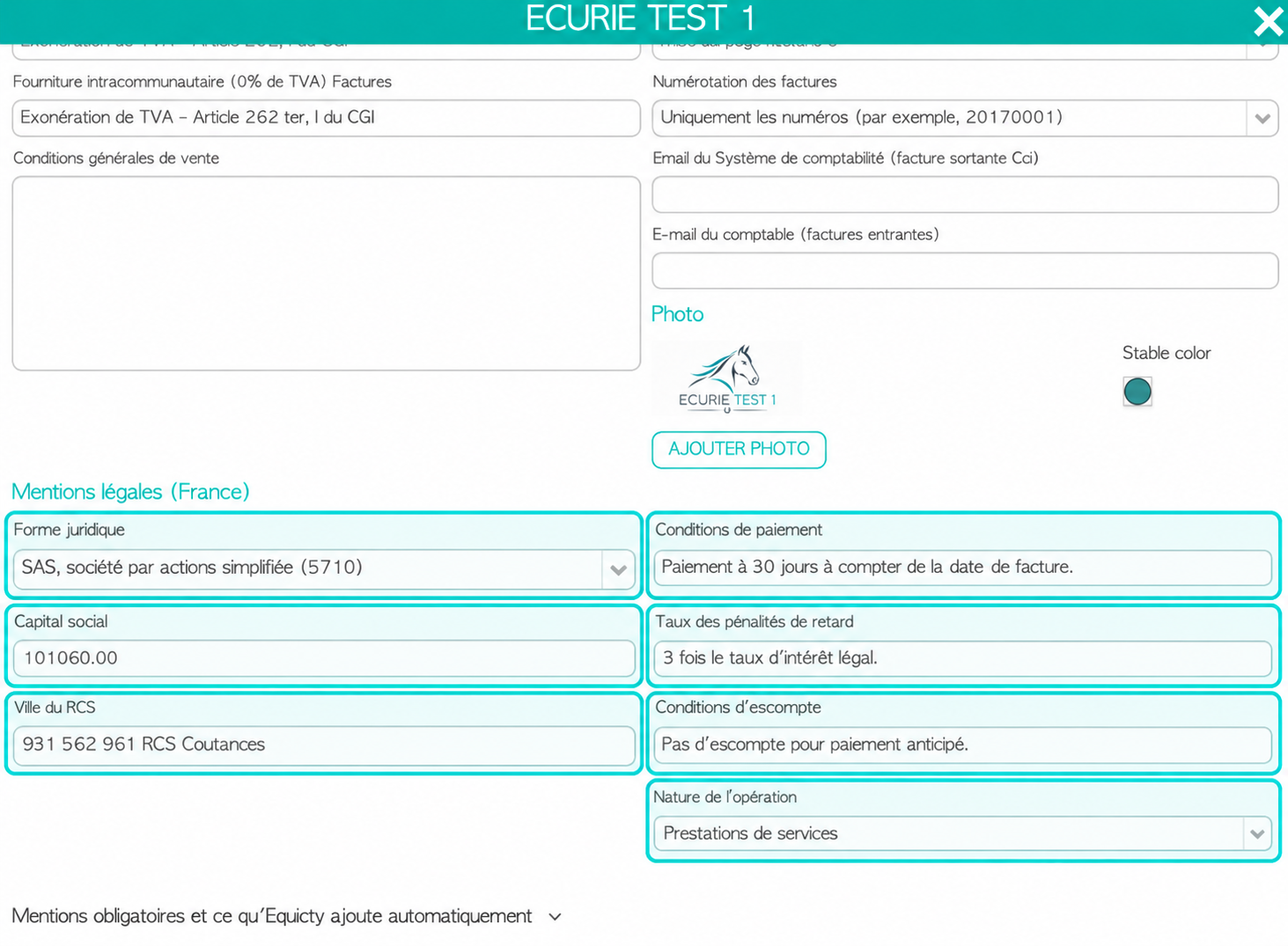
French companies also require additional legal and invoicing information.
Check in particular:
- Legal form
- Share capital
- RCS registration
- Payment terms
- Late-payment penalty rate
- Early-payment discount conditions
- Type of operation
For some fields, Equicty automatically suggests a commonly used default value. You can change these values if different conditions apply to your company.
Save any changes before continuing.
2. Start the e-invoicing activation
Return to My stable.
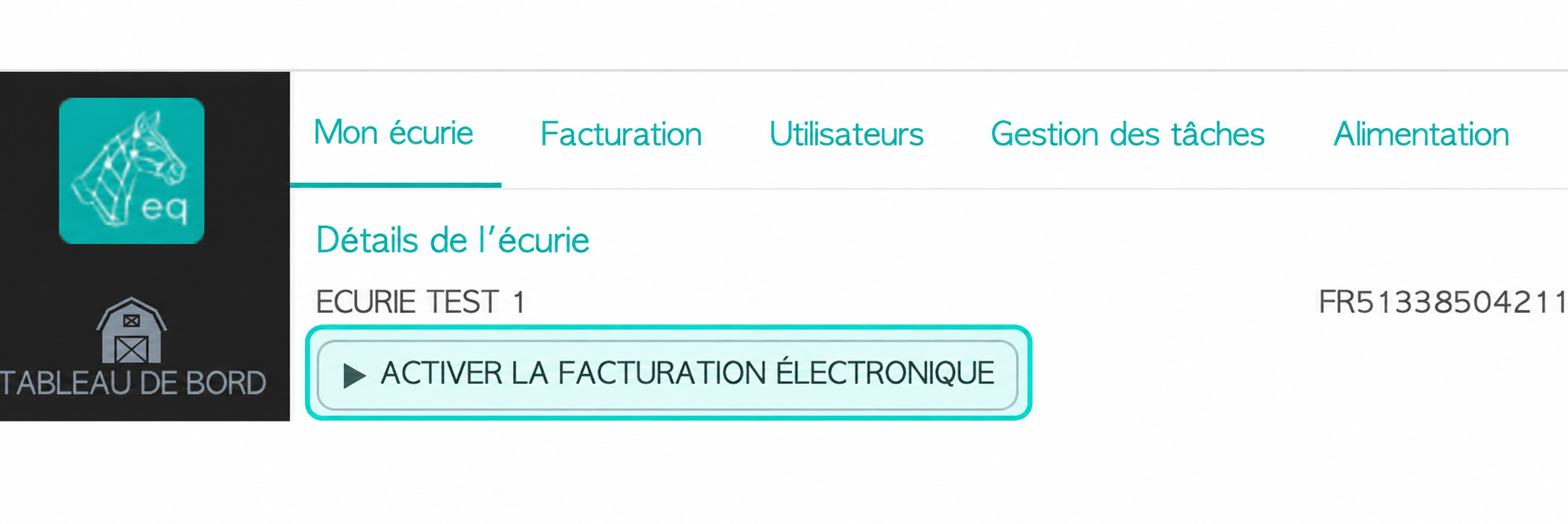
Next to the French company for which e-invoicing has not yet been activated, you will find the button:
Enable e-invoicing
Click this button to start the activation process.
Equicty will check whether the required company information is available.
If any mandatory information is missing, you will need to complete it before you can finish the activation.
3. Check the activation information
Equicty automatically retrieves as much information as possible from your company profile, so you do not need to enter the same information again.
Carefully check the company information displayed.
We will also ask for some information about the person completing the activation.
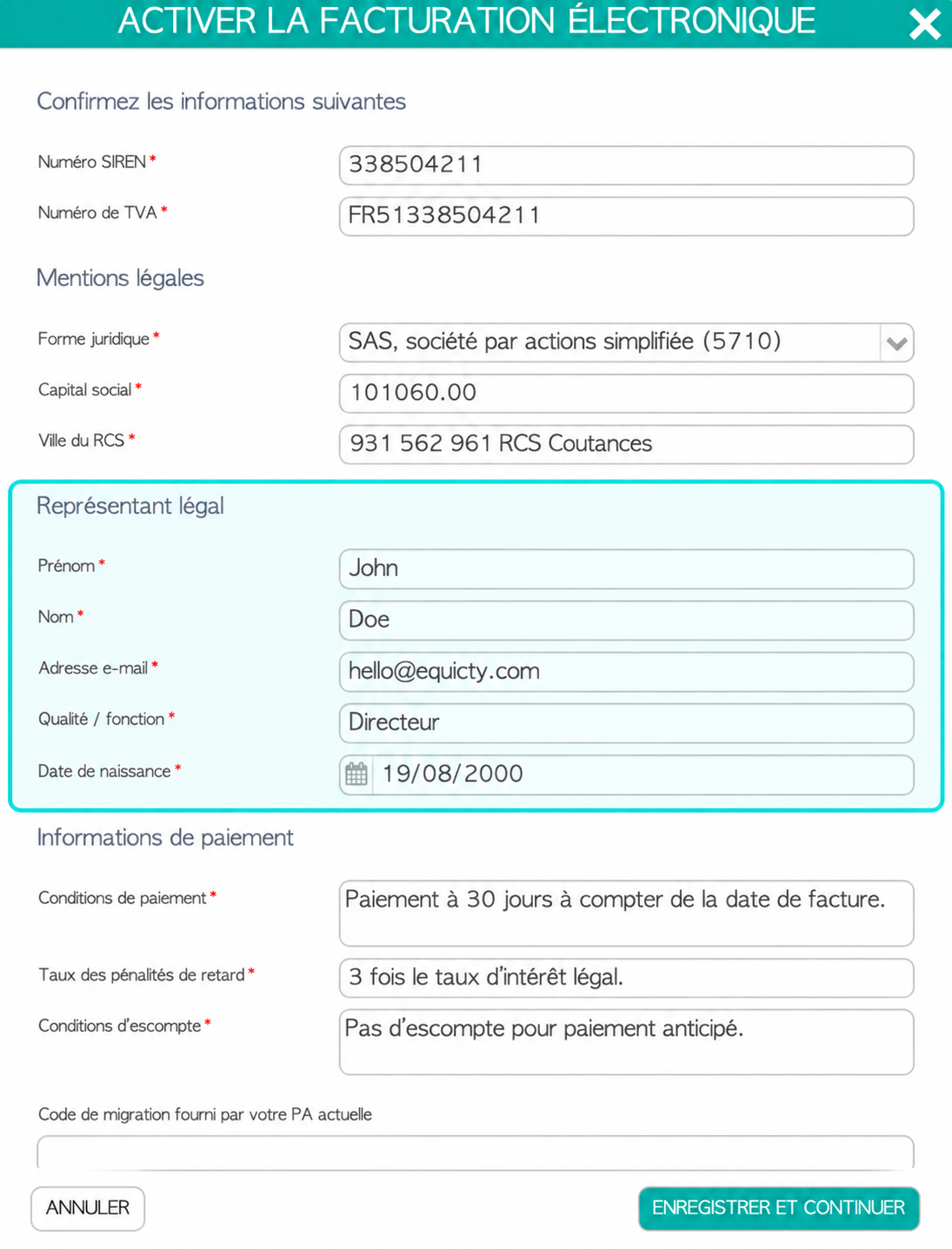
Enter the requested details for the person authorised to act on behalf of the company, including:
- First name
- Last name
- Email address
- Position
- Date of birth
Check the information carefully before continuing.
4. Check your invoicing terms
During the activation process, Equicty also displays the terms that will be used for your invoicing.
Payment terms
Specify when your invoices must be paid.
For example:
Payment within 30 days from the invoice date.
Late-payment penalty rate
Specify the rate or conditions that apply when an invoice is paid late.
For example:
3 times the statutory interest rate.
Early-payment discount conditions
Specify whether a customer receives a discount for paying an invoice before its due date.
For example:
No discount for early payment.
Type of operation
Specify the type of transactions your company mainly invoices:
- Supply of goods
- Services
- Supply of goods and services
For a stable that mainly invoices boarding, training, lessons or other services, Services will generally be the appropriate choice.
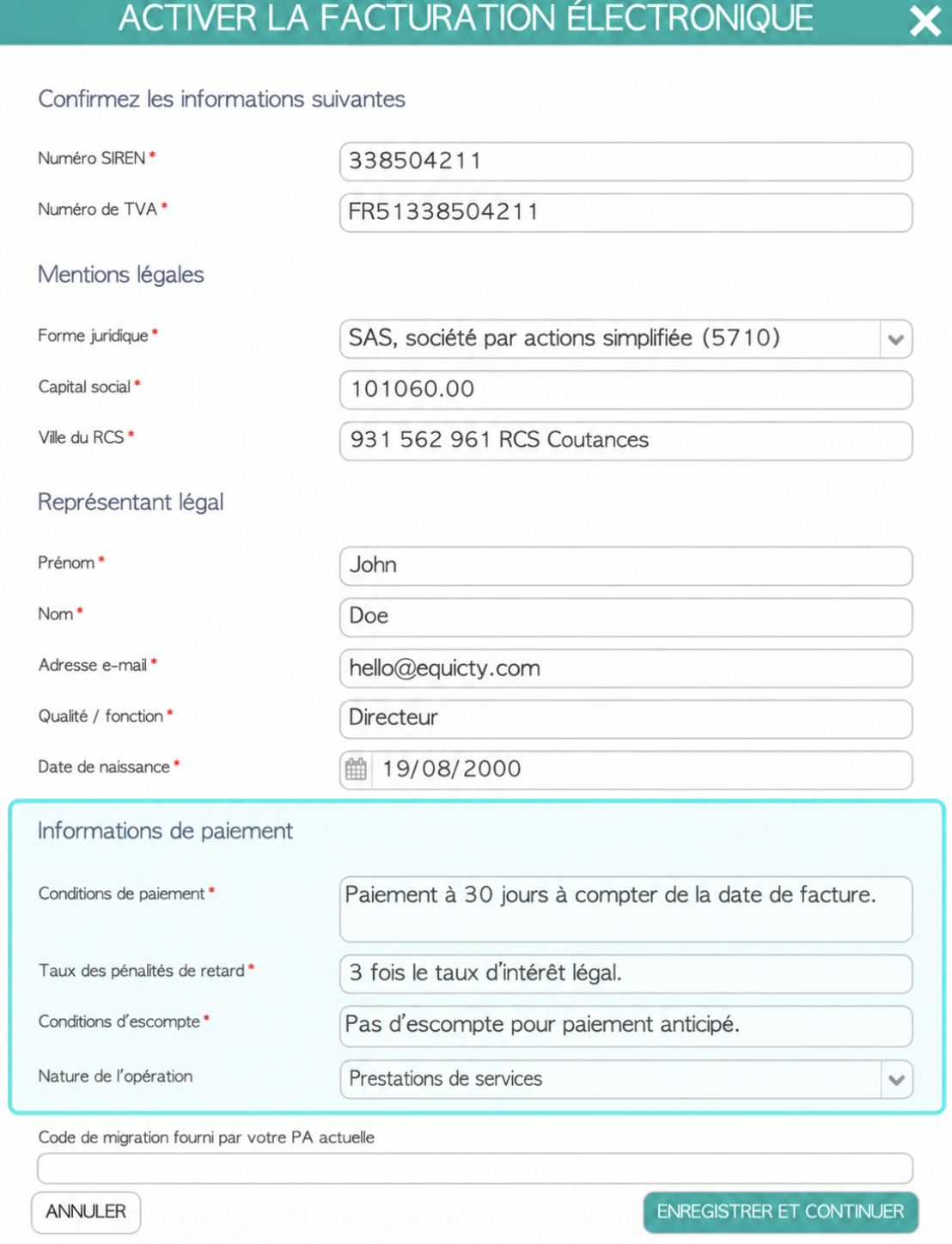
Equicty provides default values where possible. Check these values and change them if different conditions apply to your company.
5. Designate B2Brouter as your Plateforme Agréée
For French e-invoicing, Equicty works with B2Brouter.
B2Brouter acts as a Plateforme Agréée (PA) and, through its integration with Equicty, provides the connection to the French e-invoicing ecosystem.
During activation, you authorise B2Brouter to act as the Plateforme Agréée for your company.
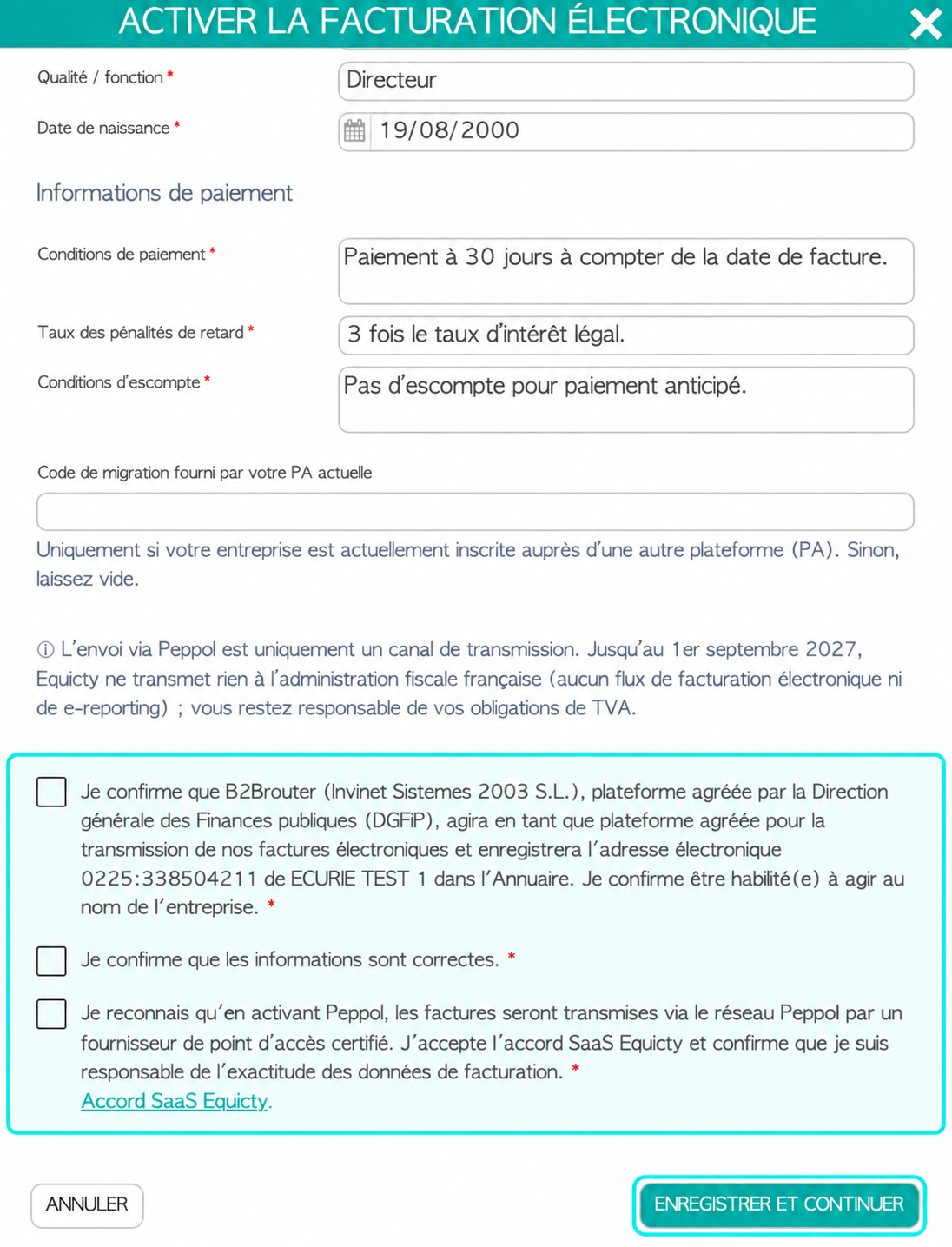
You confirm, among other things, that:
- B2Brouter may act as the Plateforme Agréée for your company;
- the information required for electronic invoicing may be registered;
- you are authorised to act on behalf of the company;
- the information provided is correct.
After checking these confirmations, complete the activation.
For more information about the role of Plateformes Agréées, see the official information provided by the French tax authorities:
DGFiP – Electronic invoicing and approved platforms
6. What happens after activation?
After submitting your request, a new e-invoicing section appears under your company.
Here you can monitor the status separately for:
- Sending – sending electronic invoices
- Receiving – receiving electronic invoices
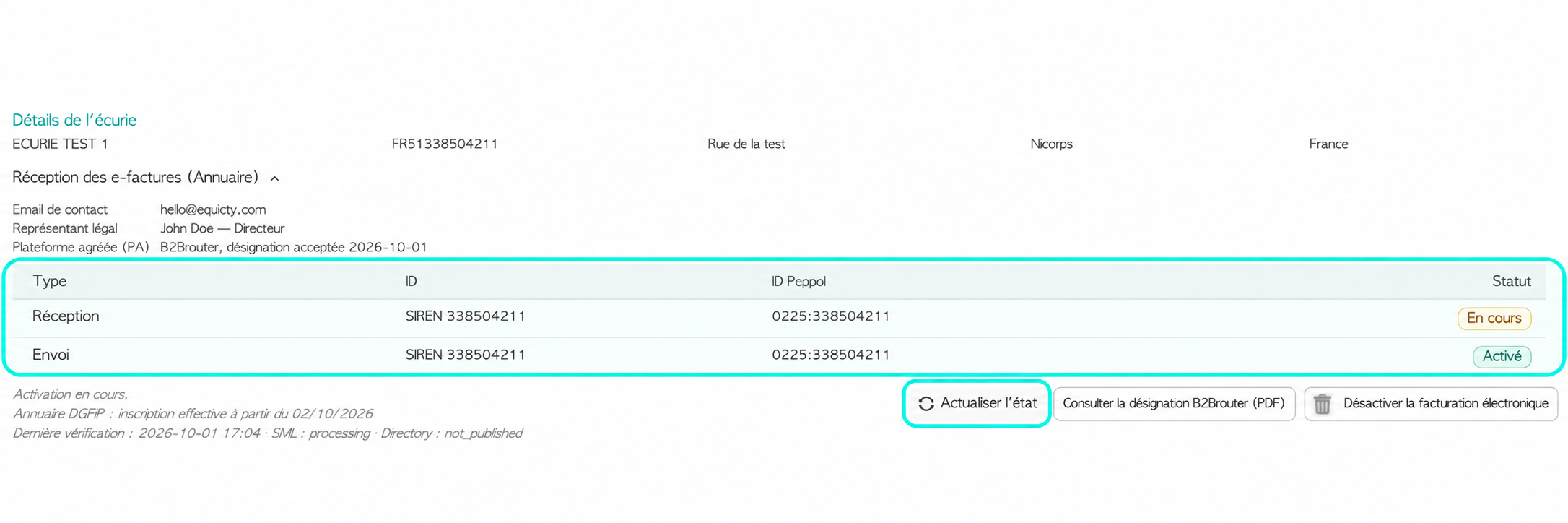
It is possible for Sending to already show Enabled, while Receiving temporarily remains Pending.
This is normal.
Before your company can receive electronic invoices, its registration must also be processed and published in the
French Annuaire de la facturation électronique.
Use Refresh status to retrieve the latest status.
7. Publication in the Annuaire may take some time
After a successful activation request, the receiving status may temporarily remain:
Pending
This does not necessarily mean that the activation has failed.
The request has been submitted, but the registration still needs to be processed and published by the external French infrastructure.
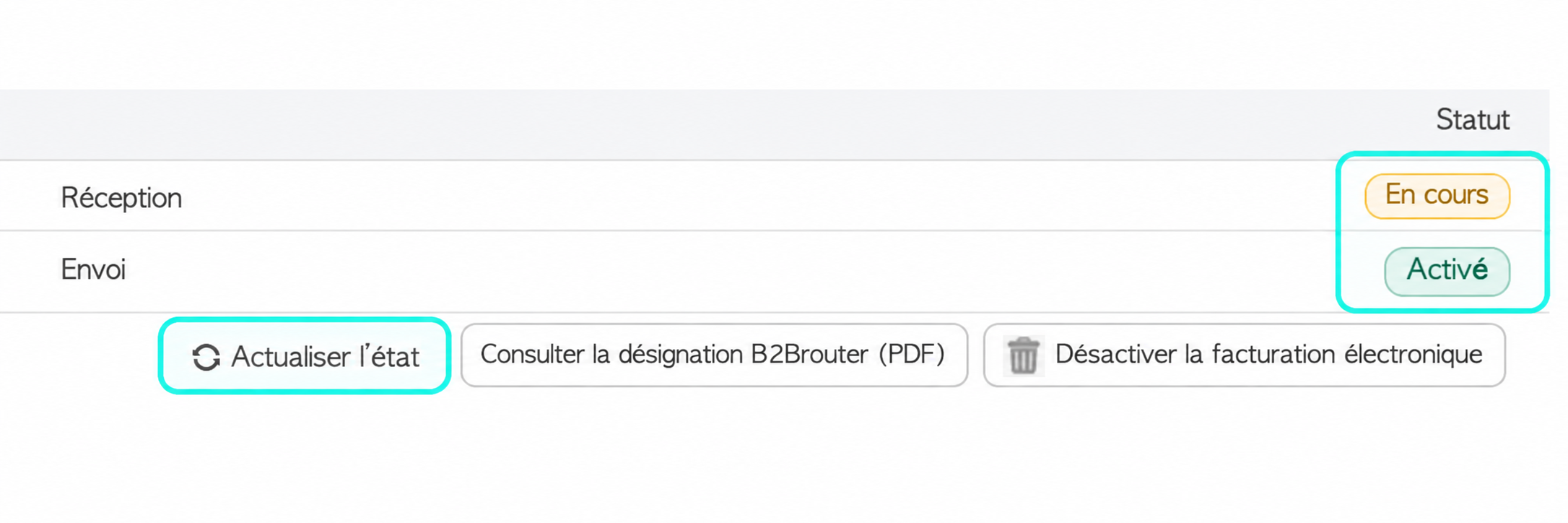
This processing takes place outside Equicty, so the processing time is outside our control.
You do not need to restart the activation while the registration is pending.
After some time, use Refresh status to check the registration again.
Once the registration has been processed, the receiving status will also change to:
Enabled
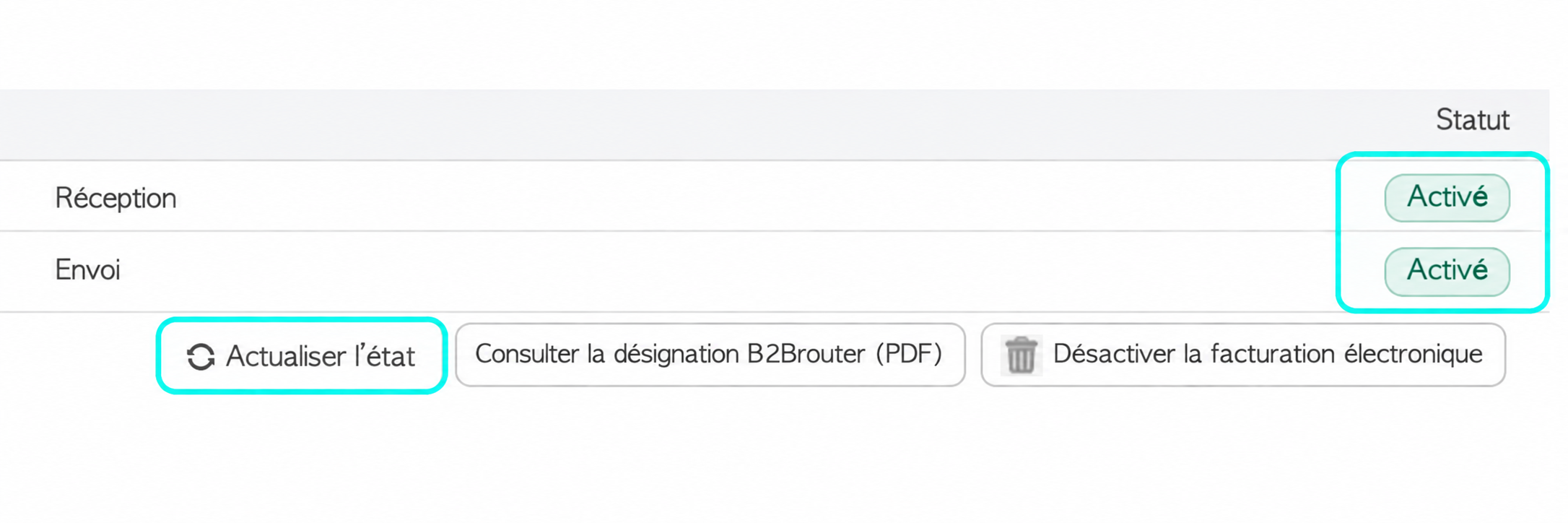
Equicty also displays when the Annuaire registration becomes effective and when the status was last checked.
8. Check your registration in the official Annuaire
You can also check whether your company has been published in the official French Annuaire de la facturation électronique.
The Annuaire is the central directory used to identify businesses and correctly route their electronic invoices.
Open the official French e-invoicing directory
Search for your company using its:
SIREN or SIRET number
Once your registration has been published, you can check whether an active invoicing address and a linked Plateforme Agréée are present.
For example, the Annuaire may display:
Adresse de facturation active : Oui
and:
Plateforme(s) agréée(s) rattachée(s) : Oui
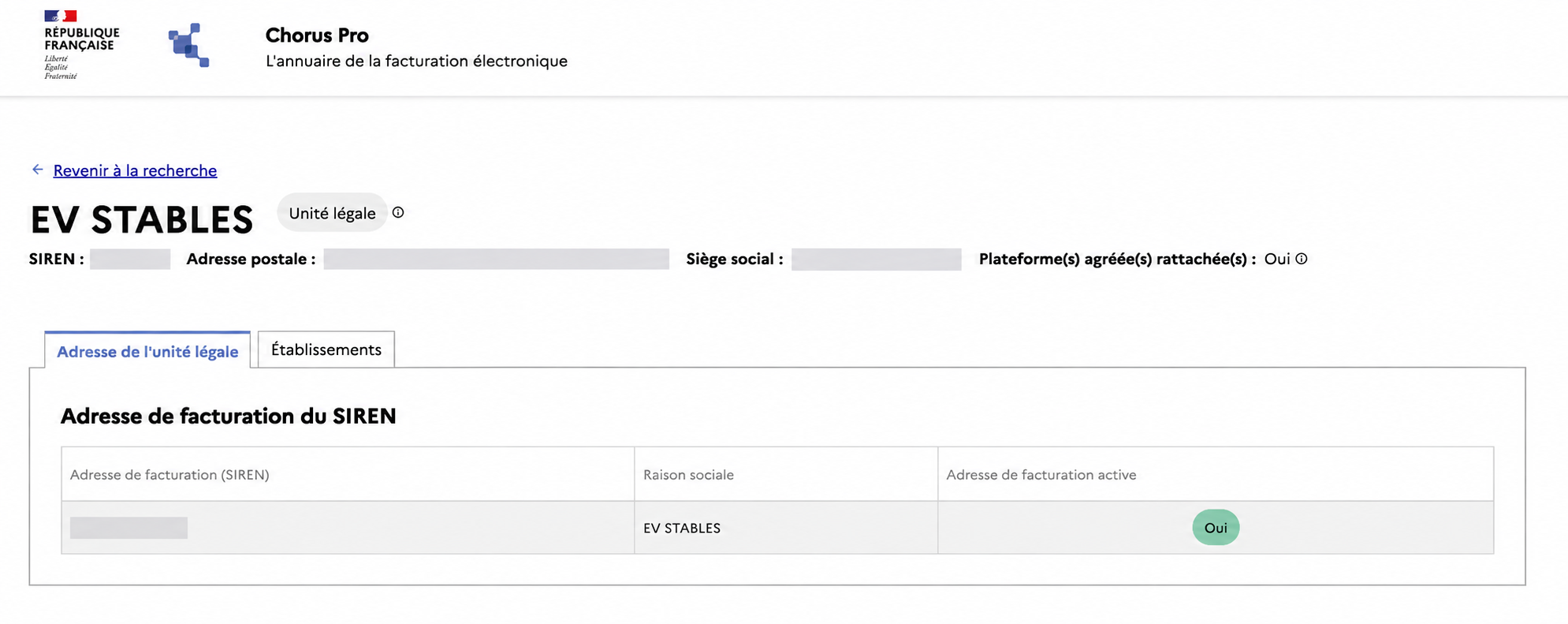
This provides an independent confirmation that your company is correctly registered to receive electronic invoices.
9. What if activation fails because your company is already registered?
In some cases, the activation for receiving electronic invoices cannot be completed because your company is already registered with another provider.
This does not necessarily indicate a problem with Equicty or with the activation process.
It means that a registration for receiving electronic invoices already exists through another provider.
How can my company already be registered?
You may not be aware that this registration exists.
For example, it may previously have been created:
- through another invoicing application;
- through accounting software;
- by your accountant or bookkeeper;
- through your bank or another financial institution;
- by another e-invoicing provider.
It is therefore possible for a registration to exist even if you have never consciously selected another e-invoicing platform yourself.
Check the Annuaire first
Search for your company in the official Annuaire:
Check your company in the official Annuaire
Use your SIREN or SIRET number.
If, for example, you see:
Plateforme(s) agréée(s) rattachée(s) : Oui
and:
Adresse de facturation active : Oui
an active receiving configuration already exists.
10. How do I switch from another provider to Equicty?
If you want to use Equicty to receive your electronic invoices, the existing registration must be transferred to the Plateforme Agréée used by Equicty.
Contact your current provider and ask them to release or migrate your registration for receiving electronic invoices.
Important: This does not necessarily mean that you need to close your entire account with your bank, accounting software provider or other service provider. The request specifically concerns the registration and routing used for receiving electronic invoices.
Migration code
Depending on your current Plateforme Agréée, you may receive a migration code.
Equicty provides the following field during activation:
Migration code provided by your current PA
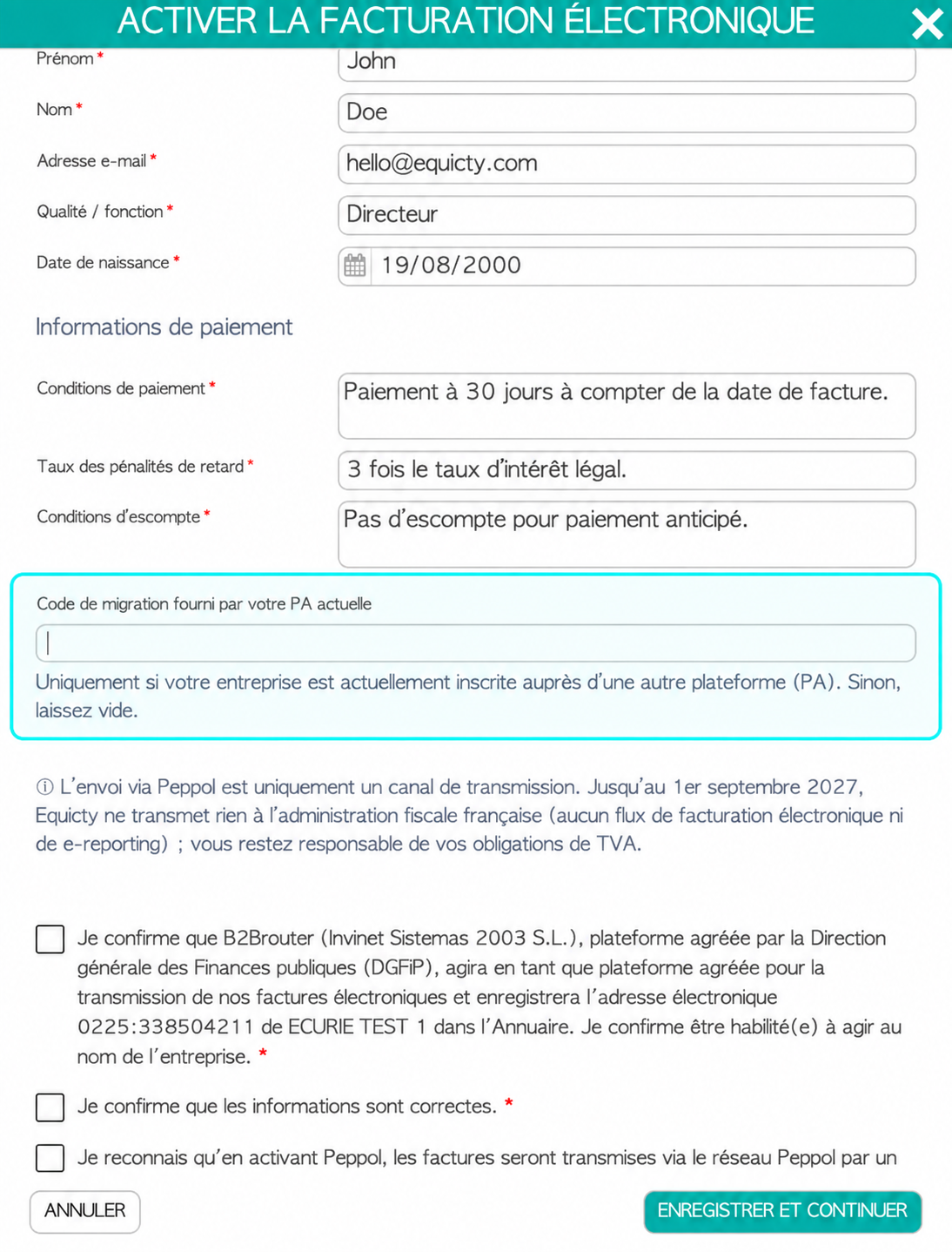
Enter the migration code and then restart the activation process.
If you do not know which provider currently manages your registration, or you are unsure how to have the existing registration released, contact Equicty Support (support@equicty.com) . We can help you check the situation.
11. When is activation complete?
Activation is complete when the following statuses are displayed:
Sending → Enabled
and:
Receiving → Enabled
and your registration has been published in the Annuaire.
Your company can then use Equicty to send and receive electronic invoices.
Activation only needs to be completed once per legal entity.
Next steps
Once e-invoicing has been activated, continue with the following guides:
→ HOWTO: Send an electronic invoice in France with Equicty
→ HOWTO: Receive electronic invoices in France with Equicty
→ FAQ: Electronic invoicing in France with Equicty
More information about e-invoicing in France
For official information about the French e-invoicing reform:
DGFiP – Moving to electronic invoicing
DGFiP – Electronic invoicing and approved platforms
To check a company's registration:
Official Annuaire de la facturation électronique
Need help?
Is your activation still Pending, are you receiving an error message, or does your company appear to already be registered with another provider?
Do not repeatedly restart the activation process and do not create a second company profile in Equicty to work around the issue.
First, check your company in the official Annuaire.
If necessary, contact Equicty Support (support@equicty.com) . We can help you verify your registration and activation status.
Was this article helpful?
That’s Great!
Thank you for your feedback
Sorry! We couldn't be helpful
Thank you for your feedback
Feedback sent
We appreciate your effort and will try to fix the article