Since 1 September 2026, all French businesses within the scope of the reform must be able to receive electronic invoices.
Once electronic invoicing has been activated for your French company in Equicty, incoming electronic invoices become directly available in Equicty. You can view, review and process them from there.
Before you start
Electronic invoicing must first be activated for your French company and the receiving status must be Active.
See: HOWTO: Activate Electronic Invoicing in France with Equicty
- 1. Where can you find received electronic invoices?
- 2. Search and filter received invoices
- 3. Open a received invoice
- 4. Check the invoice content and VAT
- 5. Check notes and payment details
- 6. View attachments
- 7. Accept or reject a received invoice
- 8. Track the status of a received invoice
- 9. Send received invoices to your accountant
- 10. How do electronic invoices arrive in Equicty?
- 11. I am not receiving electronic invoices
- 12. Good to know
1. Where can you find received electronic invoices?
In Equicty, go to:
Billing → Received invoices
Here you will find the electronic invoices received for your company.
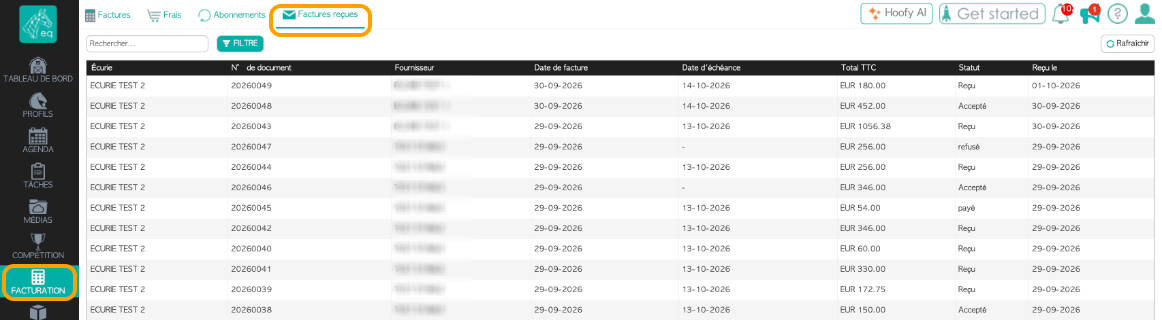
The overview shows, among other things:
- the stable or company for which the invoice was received;
- the document number;
- the supplier;
- the invoice date;
- the due date;
- the total amount including VAT;
- the current status;
- the date on which the invoice was received.
If you manage multiple companies in Equicty, you can immediately see which company each invoice is intended for.
2. Search and filter received invoices
Use the search function or click Filter to find specific received invoices.
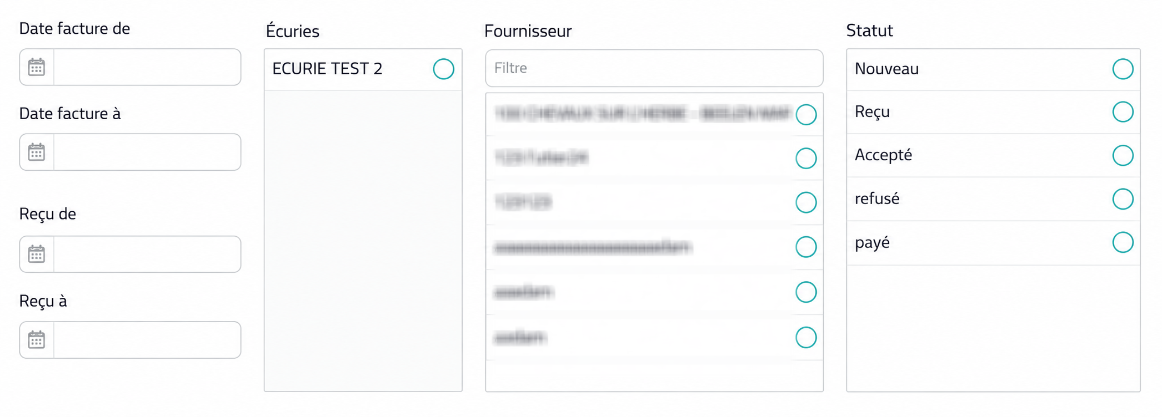
You can filter by, among other things:
- invoice date;
- date received;
- stable or company;
- supplier;
- status.
This is particularly useful if you manage multiple companies or regularly receive a large number of supplier invoices.
3. Open a received invoice
Click an invoice to view its full details.
Equicty displays the structured data received with the electronic invoice.
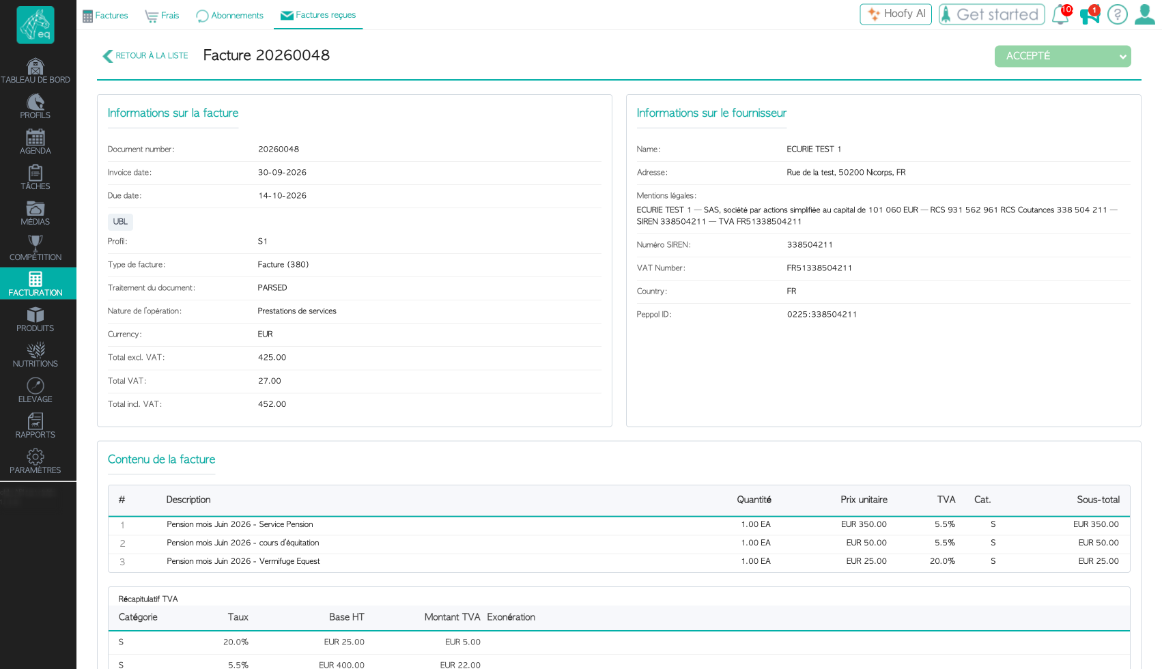
Invoice information
Under Invoice information, you will find details such as:
- document number;
- invoice date;
- due date;
- electronic format and profile;
- document type;
- nature of the transaction;
- currency;
- total excluding VAT;
- VAT amount;
- total including VAT.
Supplier information
Under Supplier information, you will find the identification details transmitted with the electronic invoice, such as:
- name;
- address;
- legal information;
- SIREN;
- VAT number;
- country;
- electronic identifier.
Check this information before processing the invoice further.
4. Check the invoice content and VAT
Further down the invoice detail page, you will find the individual invoice lines.
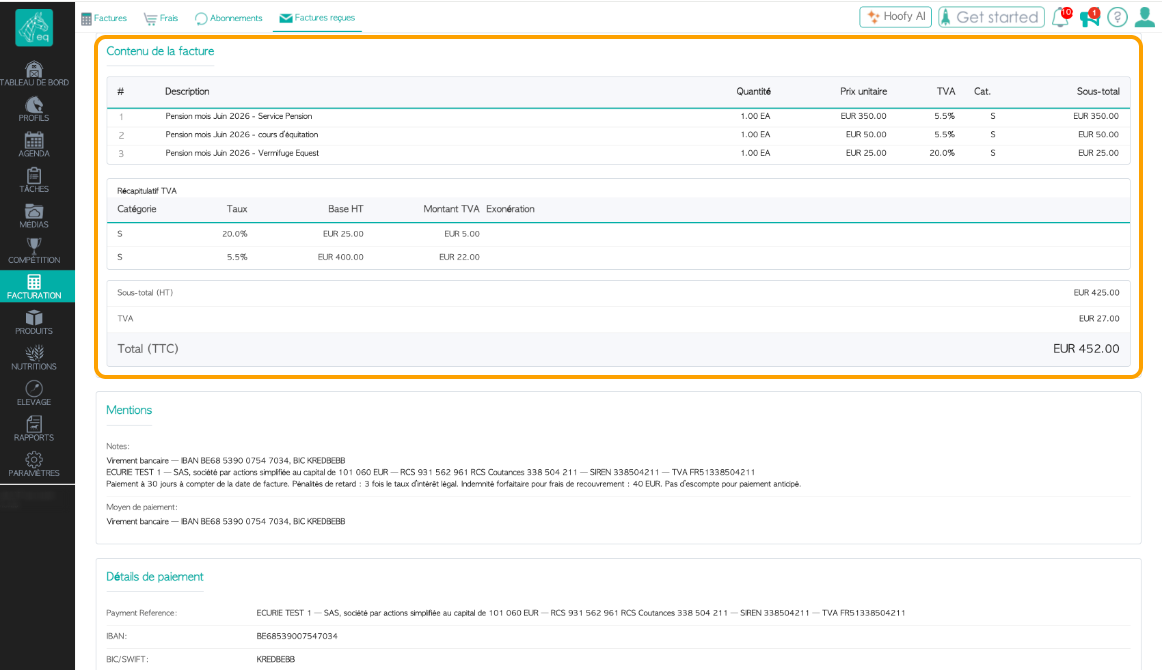
For each invoice line, you can see information such as:
- description;
- quantity;
- unit price;
- VAT rate;
- subtotal.
Below the invoice lines, Equicty displays the VAT summary and invoice totals.
Check that the invoiced goods or services, amounts and VAT are correct before accepting the invoice.
5. Check notes and payment details
An electronic invoice may contain additional information besides the individual invoice lines.
Equicty displays this information separately so that you can also review the payment terms and payment details.
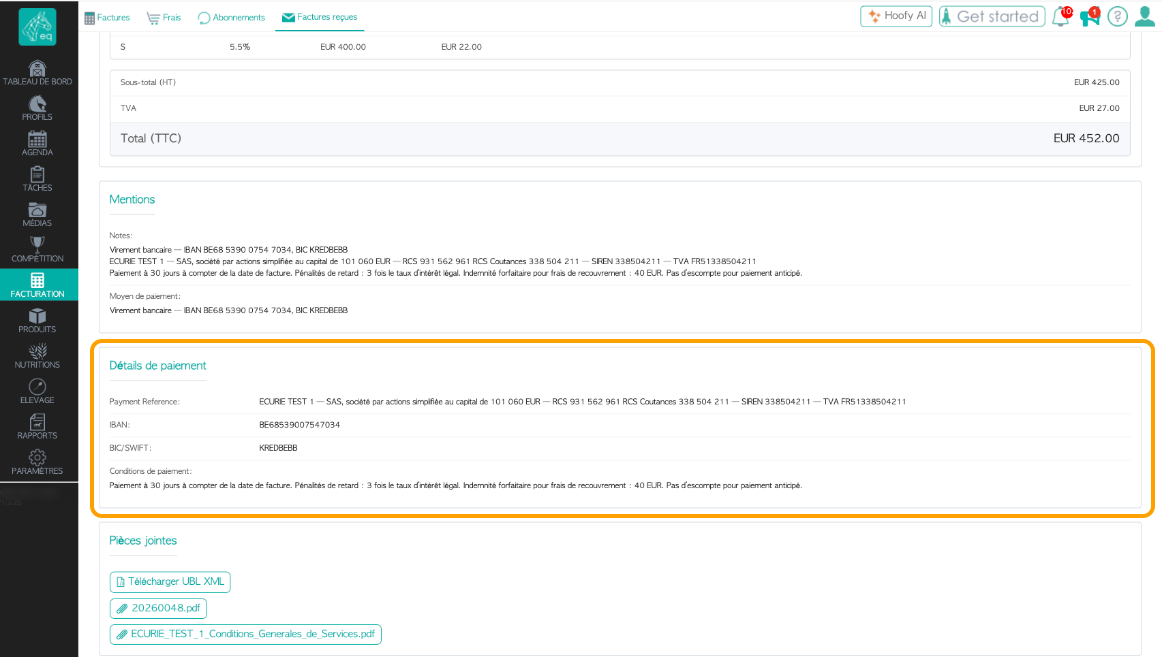
Depending on the information provided by the supplier, this may include:
- payment terms;
- legal information;
- IBAN;
- BIC/SWIFT;
- payment reference;
- late-payment information;
- other payment information.
The information available may vary depending on the supplier and invoice.
6. View attachments
At the bottom of the received invoice, you will find Attachments.
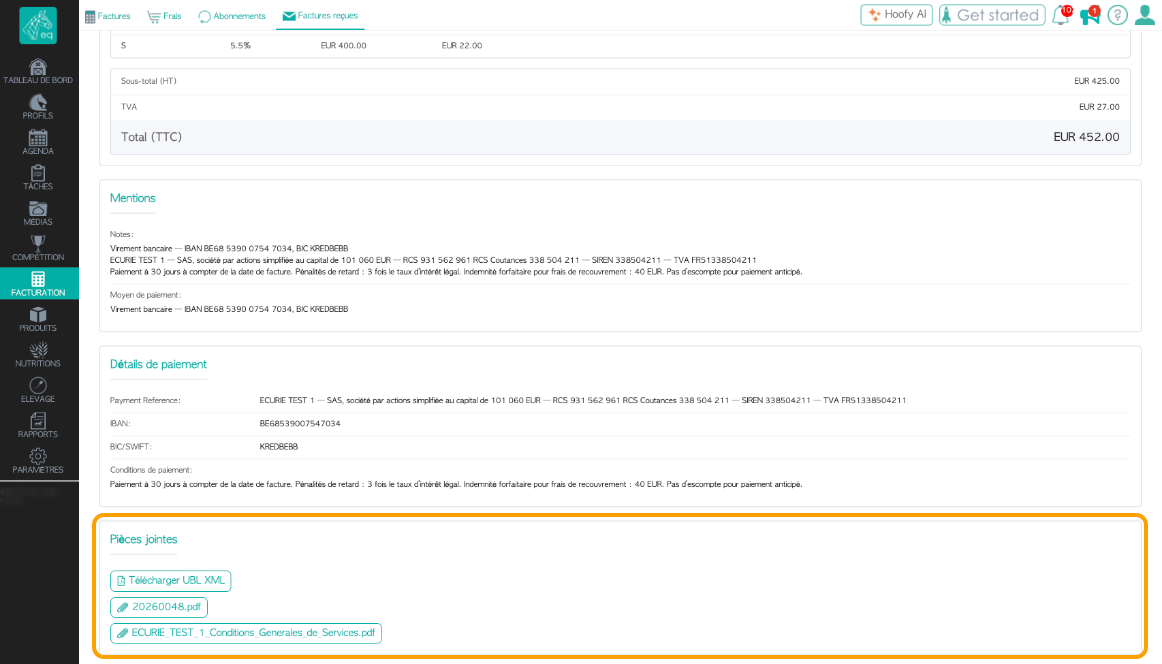
Depending on what was transmitted with the electronic invoice, different documents may be available, such as:
- the structured UBL XML file;
- a PDF representation of the invoice;
- additional documents from the supplier.
Click a file to download it.
What is the UBL XML file?
The XML file contains structured invoice data that can be processed automatically by electronic invoicing systems.
An electronic invoice is therefore not simply a PDF sent by email. Under the French reform, an electronic invoice must use an accepted electronic format containing structured data and be transmitted through the designated electronic invoicing infrastructure.
7. Accept or reject a received invoice
When a received invoice still needs to be processed, the following question appears at the top:
Do you accept this invoice?
You can then choose between:
Accept or Reject
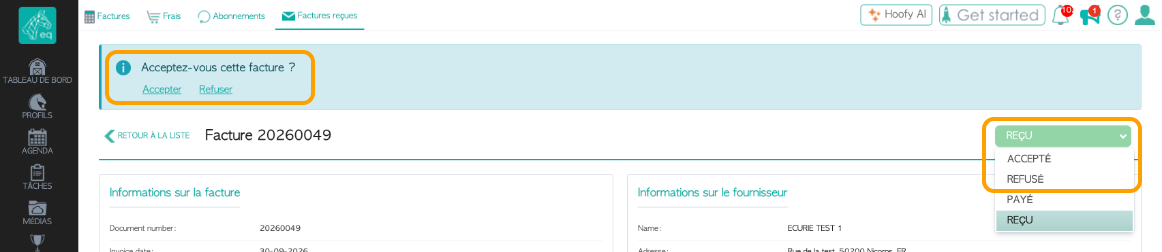
Review the invoice before making your choice.
Accept
Choose Accept when you have reviewed the invoice and it is correct.
The invoice will then receive the status:
Accepted
Reject
Choose Reject when you do not accept the invoice, for example because:
- the invoice is not intended for your company;
- the invoice contains incorrect information;
- the amounts or services are incorrect;
- the supplier needs to issue a corrected invoice.
The invoice will then receive the status:
Rejected
A business rejection by the customer is not the same as a technical rejection of an electronic document. These situations are handled separately within the French electronic invoicing system.
8. Track the status of a received invoice
At the top right of the invoice detail page, you can see its current status.
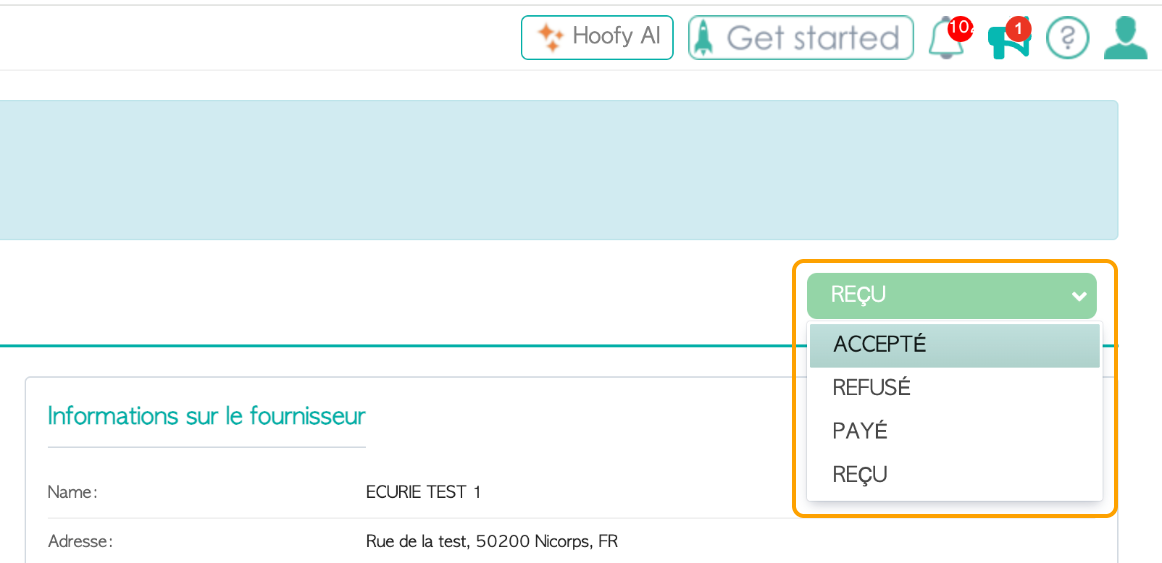
The main statuses used for day-to-day processing are:
Received
The invoice has been received electronically and is available in Equicty.
Accepted
You have reviewed and accepted the invoice.
Rejected
You have indicated that you do not accept the invoice.
Paid
The invoice has been paid.
This means that Received invoices not only shows which invoices have arrived, but also allows you to track where each invoice is in your administrative process.
A typical workflow could be:
Received → Accepted → Paid
If you do not accept an invoice:
Received → Rejected
Important
Received does not automatically mean that you have accepted the invoice. Review the invoice first and then accept or reject it.
9. Send received invoices to your accountant
Equicty allows you to configure a separate email address for incoming invoices.
Go to:
My stable → Stable details
In the invoice settings, you will find:
Accountant email (incoming invoices)
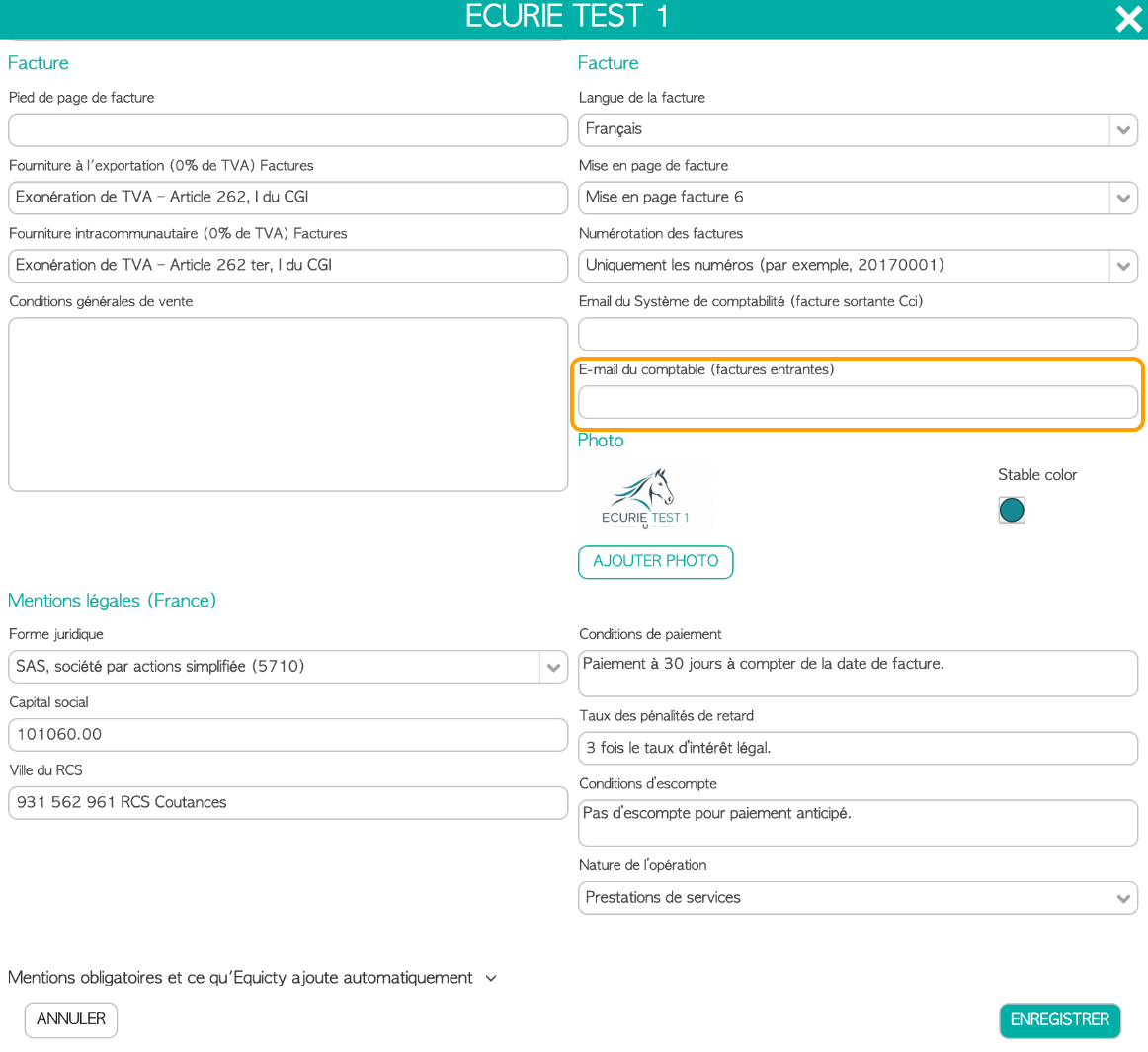
Enter the email address used to process your incoming invoices.
This can, for example, be your accountant's email address or a dedicated email address provided by your accounting system.
Note: Accounting system email (outgoing invoice Bcc) serves a different purpose and is used for outgoing invoices.
10. How do electronic invoices arrive in Equicty?
You do not need to manually import electronic invoices into Equicty.
Once electronic invoicing has been correctly activated for your French company, electronic invoices received for your company automatically become available under:
Billing → Received invoices
For French electronic invoicing, Equicty uses B2Brouter as its Plateforme Agréée (PA).
A Plateforme Agréée provides the connection to the French electronic invoicing ecosystem and is responsible for receiving and transmitting electronic invoices for its clients.
For more information about Plateformes Agréées, see the official information provided by the French tax authorities:
DGFiP – Electronic invoicing and accredited platforms
11. I am not receiving electronic invoices
First, check whether electronic invoice receiving is active for the correct company.
Go to:
My stable
For the relevant French company, check that the Receiving status is set to Active.
If receiving is still Pending, the registration in the French Annuaire de la facturation électronique may still be processing.
Use Refresh status to retrieve the latest status.
If receiving is active but a specific invoice is missing, also check whether the supplier sent the invoice to the correct company.
See also:
HOWTO: Activate Electronic Invoicing in France with Equicty
12. Good to know
Since 1 September 2026, all companies within the scope of the French reform must be able to receive electronic invoices when their supplier is required to issue them electronically. Large companies and intermediate-sized enterprises must also issue electronic invoices from that date.
For small and medium-sized enterprises and micro-enterprises, mandatory electronic invoice issuance applies from 1 September 2027.
For official information about the French electronic invoicing reform:
DGFiP – Discover electronic invoicing
See also
- HOWTO: Activate Electronic Invoicing in France with Equicty
- HOWTO: Sending Electronic Invoices in France with Equicty
Was this article helpful?
That’s Great!
Thank you for your feedback
Sorry! We couldn't be helpful
Thank you for your feedback
Feedback sent
We appreciate your effort and will try to fix the article